Mix goods by percentage
Give any good the building normally accepts a share of its capacity, down to 0.01%. Shares must total exactly 100%, so every slot has a purpose.
A mod for Timberborn
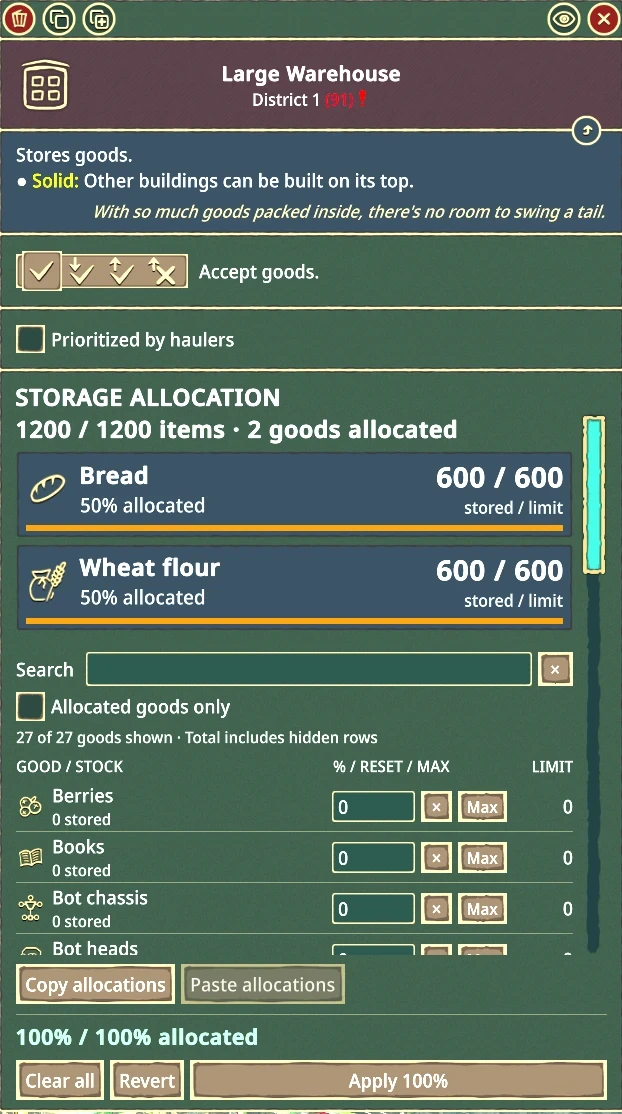
MixedStorage lets a single warehouse or pile hold several kinds of goods, and you choose how much space each one gets, by percentage.
What it does
A 1,200-capacity warehouse can reserve 50% for carrots (600) and 50% for gears (600). Percentages reserve space. They don't create goods or instantly fill the building, so your beavers keep hauling by the normal rules.
Give any good the building normally accepts a share of its capacity, down to 0.01%. Shares must total exactly 100%, so every slot has a purpose.
Summary cards show each good's icon, stored / limit count, allocated percentage, and a fill bar, including incoming deliveries and excess stock.
Search the goods list, show only allocated goods, click Max to give one good everything, or copy an allocation and paste it into another compatible building. Edits stay drafts until you Apply.
Lowering a limit never deletes goods. Extras are flagged as excess and leave the normal way, and deliveries already on their way are counted before a change is accepted.
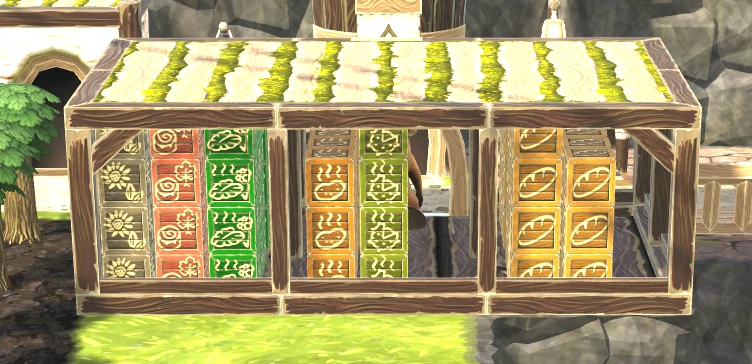
Warehouses and piles show the mix using the game's own goods models, divided by allocation. The panel always has the exact numbers.
BeaverBuddies support is built in and switches on automatically when BeaverBuddies is installed. Applied allocations synchronize between players.
Uses the game's own panel frames, buttons, input fields, checkbox, and scrollbar.
The goods list scrolls while Copy, Paste, the total, and Apply / Revert stay in a fixed footer.
The editor is sized to your window and leaves room for the game's Construction site panel.
Try it
This is a working copy of the Storage Allocation panel, styled like the game. Edit percentages, then Apply, just as you would in Timberborn. It uses the mod's own rounding and messages.
A replica for illustration, not part of the game. It lists all 27 goods a Folktails warehouse accepts, and nothing here is saved. Goods icons are Timberborn's.
In the world
Warehouses and piles show what's inside using the game's own goods models and materials, divided by allocation. The visual split is approximate, since whole visible cells can't always match a percentage exactly. The panel always shows the exact counts.
Banners still show a single representative good, and if a model can't be divided, MixedStorage falls back to the original visuals.
Supported buildings
| Faction | Warehouses | Piles |
|---|---|---|
| Folktails | Small, medium, large | Small, large, underground |
| Iron Teeth | Small, medium, large | Small industrial, large industrial |
Buildings keep their normal accepted goods. Warehouses don't gain pile-only goods, or vice versa. Tanks and map-editor reserve storage are not included.
Built against Timberborn 1.1.2.4.
Harmony 2.4.1 or newer, enabled alongside MixedStorage.
BeaverBuddies for multiplayer. Support is bundled; there's no separate add-on.
Get started
Grab the ZIP from the release's Assets and extract its MixedStorage folder into Documents\Timberborn\Mods.
Turn on Harmony and MixedStorage in the game's mod manager and restart when prompted.
Select a supported warehouse or pile, enter percentages that total 100% in Storage Allocation, and click Apply 100%.
MixedStorage is under active development. New builds are published as pre-releases first and marked as the latest release once they've been checked in game. Players have reported successful use of earlier builds, and automated checks cover the allocation math, mesh geometry, native game API calls, and optional multiplayer loading. Those checks don't replace live gameplay testing, particularly for multiplayer.
Found something odd? Check the troubleshooting guide or open an issue.
One download covers single-player and BeaverBuddies multiplayer.